Hadoop Day 3

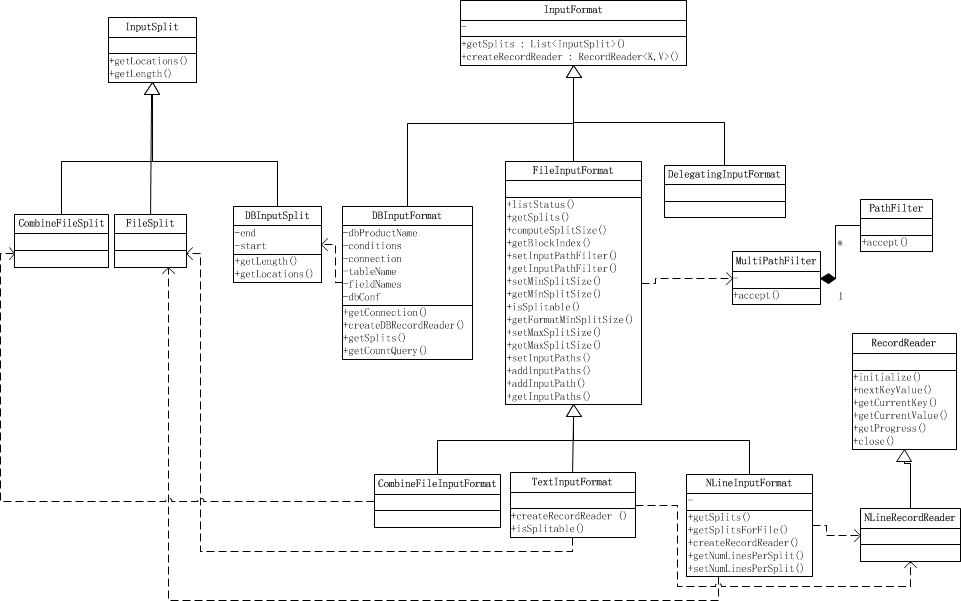
读取数据部分的关系图

InputFormat

首先我们先看看官方文档对 InputFormat的解释

从api文档中我们可以了解到InputFormat主要干3件事:

  1. 验证作业输入的正确性,如格式等
  2. 将输入文件切割成逻辑分片(InputSplit),一个InputSplit将会被分配给一个独立的Map任务
  3. 提供RecordReader实现,读取InputSplit中的”K-V对”供Mapper使用

基于文件的InputFormats(通常是FileInputFormat的子类)的默认行为是根据输入文件的总大小(以字节为单位)将输入拆分为逻辑InputSplits。 但是,输入文件的FileSystem块大小被视为输入拆分大小的上限。 可以通过mapreduce.input.file.inputformat.split.minsize设置拆分大小的下限。

显然,基于输入大小的逻辑分割对于许多应用来说是不够的,因为要尊守记录边界。 在这种情况下,应用程序还必须实现一个RecordReader,负责尊守记录边界,并将逻辑InputSplit的面向记录的视图呈现给单个任务。

方法:

  1. List getSplits(): 获取由输入文件计算出输入分片(InputSplit),解决数据或文件分割成片问题。
  2. RecordReader <k,v>createRecordReader():<k,v> 创建RecordReader,从InputSplit中读取数据,解决读取分片中数据问题

TextInputFormat: 输入文件中的每一行就是一个记录,Key是这一行的byte offset,而value是这一行的内容

KeyValueTextInputFormat: 输入文件中每一行就是一个记录,第一个分隔符字符切分每行。在分隔符字符之前的内容为Key,在之后的为Value。分隔符变量通过key.value.separator.in.input.line变量设置,默认为(\t)字符。

NLineInputFormat: 与TextInputFormat一样,但每个数据块必须保证有且只有N行,mapred.line.input.format.linespermap属性,默认为1

SequenceFileInputFormat: 一个用来读取字符流数据的InputFormat,<key,value>为用户自定义的。字符流数据是Hadoop自定义的压缩的二进制数据格式。它用来优化从一个MapReduce任务的输出到另一个MapReduce任务的输入之间的数据传输过程。</key,value>

FileInputFormat

1
2
3
4
5
6
7
8
9
10
11
12
13
14
15
16
17
18
19
20
21
22
23
24
25
26
27
28
29
30
31
32
33
34
35
36
37
38
39
/** 
* A base class for file-based {@link InputFormat}s.
*
* <p><code>FileInputFormat</code> is the base class for all file-based
* <code>InputFormat</code>s. This provides a generic implementation of
* {@link #getSplits(JobContext)}.
* Subclasses of <code>FileInputFormat</code> can also override the
* {@link #isSplitable(JobContext, Path)} method to ensure input-files are
* not split-up and are processed as a whole by {@link Mapper}s.
*/
@InterfaceAudience.Public
@InterfaceStability.Stable
public abstract class FileInputFormat<K, V> extends InputFormat<K, V> {
public static final String INPUT_DIR =
"mapreduce.input.fileinputformat.inputdir"; //输入路径配置名称
public static final String SPLIT_MAXSIZE =
"mapreduce.input.fileinputformat.split.maxsize"; // split大小的最大值配置名称
public static final String SPLIT_MINSIZE =
"mapreduce.input.fileinputformat.split.minsize"; //split大小的最小值配置名称
public static final String PATHFILTER_CLASS =
"mapreduce.input.pathFilter.class";
public static final String NUM_INPUT_FILES =
"mapreduce.input.fileinputformat.numinputfiles";
public static final String INPUT_DIR_RECURSIVE =
"mapreduce.input.fileinputformat.input.dir.recursive"; //是否递归dir的boolean的配置名称
public static final String LIST_STATUS_NUM_THREADS =
"mapreduce.input.fileinputformat.list-status.num-threads"; //收集filestatus的list时候的线程数目配置名称
public static final int DEFAULT_LIST_STATUS_NUM_THREADS = 1; // 默认使用一个线程来做list filestatus

private static final Log LOG = LogFactory.getLog(FileInputFormat.class);

private static final double SPLIT_SLOP = 1.1; // 10% slop //当文件大小少于SPLIT_SLOP*SPLIT_SIZE时不分割

@Deprecated
public static enum Counter {
BYTES_READ
}
...
}

类的主要成员变量都是一些配置名称的String。下面我们从这个类的主要函数说起。

在List listStatus(JobContext job)中列出了输入的目录列表。子类可以对这个方法重载例如子类可以满足特定正则表达式的输入路径。

  • @param job the job to list input paths for
  • @return array of FileStatus objects
  • @throws IOException if zero items.

listStatus函数通过JobContext来获取配置信息,通过读取配置信息进行判断来进一步建立InputFile的PathFilter,如果配置中numThreads==1则使用singleThreadedListStatus()函数来的到List,否则建立LocatedFileStatusFetcher对象,多线程地得到List

1
2
3
4
5
6
7
8
9
10
11
12
13
14
15
16
17
18
19
20
21
22
23
24
25
26
27
28
29
30
31
32
33
34
35
36
37
38
39
40
41
42
43
44
45
46
47
48
49
50
protected List<FileStatus> listStatus(JobContext job
) throws IOException {
Path[] dirs = getInputPaths(job);
if (dirs.length == 0) {
throw new IOException("No input paths specified in job");
}

// get tokens for all the required FileSystems..
TokenCache.obtainTokensForNamenodes(job.getCredentials(), dirs,
job.getConfiguration());

// Whether we need to recursive look into the directory structure
boolean recursive = getInputDirRecursive(job);

// creates a MultiPathFilter with the hiddenFileFilter and the
// user provided one (if any).
List<PathFilter> filters = new ArrayList<PathFilter>();
filters.add(hiddenFileFilter);
PathFilter jobFilter = getInputPathFilter(job);
if (jobFilter != null) {
filters.add(jobFilter);
}
PathFilter inputFilter = new MultiPathFilter(filters);

List<FileStatus> result = null;

int numThreads = job.getConfiguration().getInt(LIST_STATUS_NUM_THREADS,
DEFAULT_LIST_STATUS_NUM_THREADS); //读取配置文件中的线程数
Stopwatch sw = new Stopwatch().start();
if (numThreads == 1) {
result = singleThreadedListStatus(job, dirs, inputFilter, recursive); //单线程执行ListStatus
} else {
Iterable<FileStatus> locatedFiles = null;
try {
LocatedFileStatusFetcher locatedFileStatusFetcher = new LocatedFileStatusFetcher(
job.getConfiguration(), dirs, recursive, inputFilter, true); // 多线程建立LocatedFileStatusFetcher 来多线程执行listfilestatus,在fetcher中通过 Executors.newFixedThreadPool()建立线程池
locatedFiles = locatedFileStatusFetcher.getFileStatuses();
} catch (InterruptedException e) {
throw new IOException("Interrupted while getting file statuses");
}
result = Lists.newArrayList(locatedFiles);
}

sw.stop();
if (LOG.isDebugEnabled()) {
LOG.debug("Time taken to get FileStatuses: " + sw.elapsedMillis());
}
LOG.info("Total input paths to process : " + result.size());
return result;
}

getSplits() 用于将输入文件进行拆分成splits并返回

  • Generate the list of files and make them into FileSplits.
  • @param job the job context
  • @throws IOException

通过配置文件来得到split的maxSize和minSize和filesystem的BlockSize,通过以上三个size可以算出 Math.max(minSize, Math.min(maxSize, blockSize))=splitsize。 通过上面的listStatus()来得到List并且变量list中的每一个FileStatus,按照每一个file的长度和splitsize来分片成splits

1
2
3
4
5
6
7
8
9
10
11
12
13
14
15
16
17
18
19
20
21
22
23
24
25
26
27
28
29
30
31
32
33
34
35
36
37
38
39
40
41
42
43
44
45
46
47
48
49
50
51
52
53
54
55
56
57
58
59
public List<InputSplit> getSplits(JobContext job) throws IOException {
Stopwatch sw = new Stopwatch().start();
long minSize = Math.max(getFormatMinSplitSize(), getMinSplitSize(job));
long maxSize = getMaxSplitSize(job);

// generate splits
List<InputSplit> splits = new ArrayList<InputSplit>();
List<FileStatus> files = listStatus(job);
for (FileStatus file: files) {
Path path = file.getPath();
long length = file.getLen();
if (length != 0) {
BlockLocation[] blkLocations;
// 得到blkLocations 要么通过LocatedFileStatus的getBlockLocation
// 要么通过FileSystem的getFileBlockLocations
if (file instanceof LocatedFileStatus) {
blkLocations = ((LocatedFileStatus) file).getBlockLocations();
} else {
FileSystem fs = path.getFileSystem(job.getConfiguration());
blkLocations = fs.getFileBlockLocations(file, 0, length);
}
if (isSplitable(job, path)) {
long blockSize = file.getBlockSize();
long splitSize = computeSplitSize(blockSize, minSize, maxSize);

long bytesRemaining = length;
// 对当前文件按照splitsize进行分割,分割成一个个split
while (((double) bytesRemaining)/splitSize > SPLIT_SLOP) {
int blkIndex = getBlockIndex(blkLocations, length-bytesRemaining); //得到block的index
splits.add(makeSplit(path, length-bytesRemaining, splitSize,
blkLocations[blkIndex].getHosts(),
blkLocations[blkIndex].getCachedHosts()));
bytesRemaining -= splitSize;
}

if (bytesRemaining != 0) {
int blkIndex = getBlockIndex(blkLocations, length-bytesRemaining);
splits.add(makeSplit(path, length-bytesRemaining, bytesRemaining,
blkLocations[blkIndex].getHosts(),
blkLocations[blkIndex].getCachedHosts()));
}
} else { // not splitable 不可分 整个文件作为split
splits.add(makeSplit(path, 0, length, blkLocations[0].getHosts(),
blkLocations[0].getCachedHosts()));
}
} else {
//Create empty hosts array for zero length files
splits.add(makeSplit(path, 0, length, new String[0]));
}
}
// Save the number of input files for metrics/loadgen
job.getConfiguration().setLong(NUM_INPUT_FILES, files.size());
sw.stop();
if (LOG.isDebugEnabled()) {
LOG.debug("Total # of splits generated by getSplits: " + splits.size()
+ ", TimeTaken: " + sw.elapsedMillis());
}
return splits;
}

制作切片split

1
2
3
4
5
6
7
 /*
* 制作切片split,makeSplit调用FileSplit()函数来制作切片
*/
protected FileSplit makeSplit(Path file, long start, long length,
String[] hosts, String[] inMemoryHosts) {
return new FileSplit(file, start, length, hosts, inMemoryHosts);
}

对file进行切片,并附带cached-blocks信息

1
2
3
4
5
6
7
8
9
10
11
12
13
14
15
16
17
18
19
20
21
22
23
24
 /** Constructs a split with host and cached-blocks information
*
* @param file the file name
* @param start the position of the first byte in the file to process
* @param length the number of bytes in the file to process
* @param hosts the list of hosts containing the block
* @param inMemoryHosts the list of hosts containing the block in memory
*/
public FileSplit(Path file, long start, long length, String[] hosts,
String[] inMemoryHosts) {
this(file, start, length, hosts);
hostInfos = new SplitLocationInfo[hosts.length];
for (int i = 0; i < hosts.length; i++) {
// because N will be tiny, scanning is probably faster than a HashSet
boolean inMemory = false;
for (String inMemoryHost : inMemoryHosts) {
if (inMemoryHost.equals(hosts[i])) {
inMemory = true;
break;
}
}
hostInfos[i] = new SplitLocationInfo(hosts[i], inMemory);
}
}

LineRecorder: 负责记录行的读取情况

  • param Configuration, job configuartion.
  • param FileSplit, split to read.
  • param byte[], delimiter bytes.

通过job的configuration获取文件系统fs并且以输入流的形式打开分片所在的文件,后续的逻辑是判断输入流输入的文件是否为压缩,如果是压缩的话解压后重新定位start和end。如果不是压缩的的话很简单,直接通过读取split的start和end作为LineRecordReader的start和end,并且将文件定位到分片的start处。在以上逻辑完成后判断当前分片是不是文件中的第一个分片(start==0?)如果不是的话则越过第一行。
为什么非开头的分片要越过第一行?这是由于按照blocksize大小读取的分片很可能不是按行对其的,而LineRecorderReader要处理的是行 保证行对齐是关键,通过忽略非开头分片的第一行可以做到行对其,其结果如下图所示

行对齐

那么如何计算对于非开头分片应该忽略多少才能保证行对其,即计算非开头分片start的后移量是多少呢? 主要是通过readLine()函数,该还函数返回到行末的偏移量。 后续分析。

1
2
3
4
5
6
7
8
9
10
11
12
13
14
15
16
17
18
19
20
21
22
23
24
25
26
27
28
29
30
31
32
33
34
35
36
37
38
39
40
41
42
43
public LineRecordReader(Configuration job, FileSplit split,
byte[] recordDelimiter) throws IOException {
this.maxLineLength = job.getInt(org.apache.hadoop.mapreduce.lib.input.
LineRecordReader.MAX_LINE_LENGTH, Integer.MAX_VALUE);
start = split.getStart();
end = start + split.getLength();
final Path file = split.getPath();
compressionCodecs = new CompressionCodecFactory(job);
codec = compressionCodecs.getCodec(file);

// open the file and seek to the start of the split
final FileSystem fs = file.getFileSystem(job);
fileIn = fs.open(file);
if (isCompressedInput()) {
decompressor = CodecPool.getDecompressor(codec);
if (codec instanceof SplittableCompressionCodec) {
final SplitCompressionInputStream cIn =
((SplittableCompressionCodec)codec).createInputStream(
fileIn, decompressor, start, end,
SplittableCompressionCodec.READ_MODE.BYBLOCK);
in = new CompressedSplitLineReader(cIn, job, recordDelimiter);
start = cIn.getAdjustedStart();
end = cIn.getAdjustedEnd();
filePosition = cIn; // take pos from compressed stream
} else {
in = new SplitLineReader(codec.createInputStream(fileIn,
decompressor), job, recordDelimiter);
filePosition = fileIn;
}
} else {
fileIn.seek(start);
in = new UncompressedSplitLineReader(
fileIn, job, recordDelimiter, split.getLength());
filePosition = fileIn;
}
// If this is not the first split, we always throw away first record
// because we always (except the last split) read one extra line in
// next() method.
if (start != 0) { // 如果不是文件中的第一个分片
start += in.readLine(new Text(), 0, maxBytesToConsume(start)); //忽略文件中的第一行 start后移。这里调用了readLine来计算后移的偏量
}
this.pos = start;
}

接下来我们看看readLine函数,它主要通过判断是否设定分隔符来返回 自定义和默认方式的readline。

1
2
3
4
5
6
7
8
public int readLine(Text str, int maxLineLength,
int maxBytesToConsume) throws IOException {
if (this.recordDelimiterBytes != null) { //分隔符数组为空? 即未设定分隔符?
return readCustomLine(str, maxLineLength, maxBytesToConsume); //自定义分隔符!
} else {
return readDefaultLine(str, maxLineLength, maxBytesToConsume); //否则使用默认的分隔符 即 '\r' or '\n'
}
}

感谢您的阅读,本文由 Space-X 版权所有。如若转载,请注明出处:Space-X(https://spaces-x.github.io/2018/08/19/hadoop-d-3/
HBase
Nanjing